
The internet has numerous opportunities to communicate and interact with other people with online chats, live streams, online meetings, or social media. Voice chats or calling is now a reality in the daily life of the internet. However, in some cases, individuals do not desire to speak in their natural voice. They desire to have more privacy, be safer or simply want fun to experience something new.
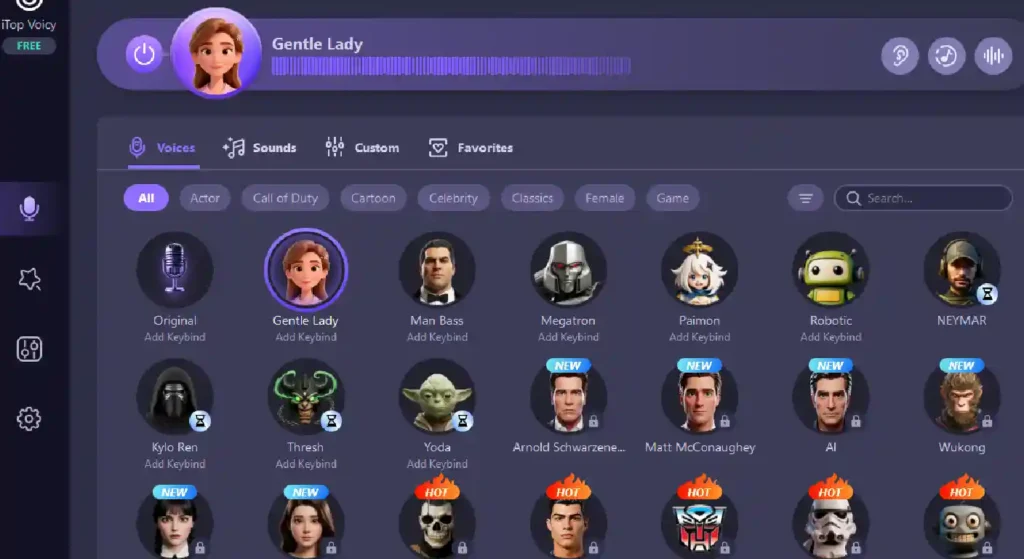
Voice changers have been used by many online. These applications allow you to modify the way that you sound as you speak. One great example is iTop Voicy. It is a voice changer for PC. It applies AI to change your voice to various styles. This works in making conversations flow naturally.
iTop Voicy: An Amazing Voice Changing Tool
iTop Voicy is a voice-changing app made for Windows computers. It uses smart AI technology to change how your voice sounds as you speak into a microphone.
iTop Voicy changes your voice instantly unlike other tools that need you to record your voice first and then edit it. The people on the other end hear your changed voice right away. iTop Voicy can be used in numerous applications such as gaming over the internet, live streaming, voice chat programs, video conferencing, and voice recording projects.
The app is easy to use. So, even beginners can start trying out different voice effects in just a few minutes.
Why Do People Want to Hide Their Real Voice Online?
Majority of the individuals would prefer to maintain their authentic voice a secret when they are chatting. These are just a few reasons why
- Protecting Privacy: Some individuals do not wish other people know their actual voice. The voice changer assists them to maintain their identity as confidential.
- Avoiding Online Harassment: Sometimes internet conversations are crude or bullying. Voice modification will assist you in escaping undesired attention or harassment. This is particularly in chat rooms of public gaming.
- Creating Characters for Videos or Streams: Content creators usually come up with characters that have their own voices. There is a change in the voice to make those characters come alive.
- Just for Fun: Many gamers like to surprise friends and make games more fun by using funny or different voice effects.
Key Features of iTop Voicy That Makes It Stand Out
Knowing the main features of iTop Voicy will help you understand how it can be used for privacy and creativity.
Instant Voice Changing
It is one of the most amazing features of iTop Voicy since your voice is transformed immediately.
One of the best things about iTop Voicy is that it changes your voice instantly. When you speak into your microphone, it processes the sound right away.
The changed voice goes directly to your game or chat app. So, conversations feel natural and smooth. You can adjust different parts of your voice like pitch, tone, voice style, and age or gender characteristics.
Jacob Nicholas Caan: Life, Family Background, and Personal Journey
An Amazing Variety of AI Voice Models
The app has many different voice styles to choose from. Some voices are playful or cartoonish. On the other hand, others are deeper or sound robotic.
This variety lets you pick a voice that fits your needs. For example, the streamers may desire a dramatic narrator voice, whereas gamers may wish to have a funny character voice.
One-Click Voice Change for Audio and Video Files
In addition to changing your voice live, iTop Voicy can also modify recorded audio and video files. You can import a file and apply a new voice style to it. This is great for creating content like storytelling videos or voice-over clips. The steps are simple:
- Import the file.
- Choose a voice model.
- Convert the file.
Record with Noise Reduction
iTop Voicy also has a built-in recording feature. When you are using a voice model, you can record your voice directly in the app. It is also equipped with noise reduction which eliminates the background sounds and echo. This assists in recording your voice more clearly and easier to listen. This feature is perfect for
- Podcasts
- Audiobooks
- Commentary videos
- Narration recordings
Create Custom Voice Models
If you want a unique voice that is not in the library of app, you can create your own custom voice models. Just import a voice sample and adjust settings like pitch and tone. After you are happy with how it sounds, save your new voice style and give it a name.
This lets you build a collection of voices for different situations.